Download Receipt
Image
API to download receipt with JPEG or PNG format after making prepaid transaction.
In production environment, you must whitelist your IP here to be able to download receipt.
Path
| Method | Path |
|---|---|
| GET | api/download/:tr_id |
Request Header
The Content-Type header in the request must be set appropriately to JPEG or PNG to get the desired image format of the receipt.
Content-Type: image/jpeg
Content-Type: image/png
Path Parameters
| Attributes | Type | Description | Mandatory |
|---|---|---|---|
| tr_id | Integer | Transaction id | Yes |
Path Example
Path to download receipt in Image (JPEG/PNG) format.
BASE_URL/api/download/123
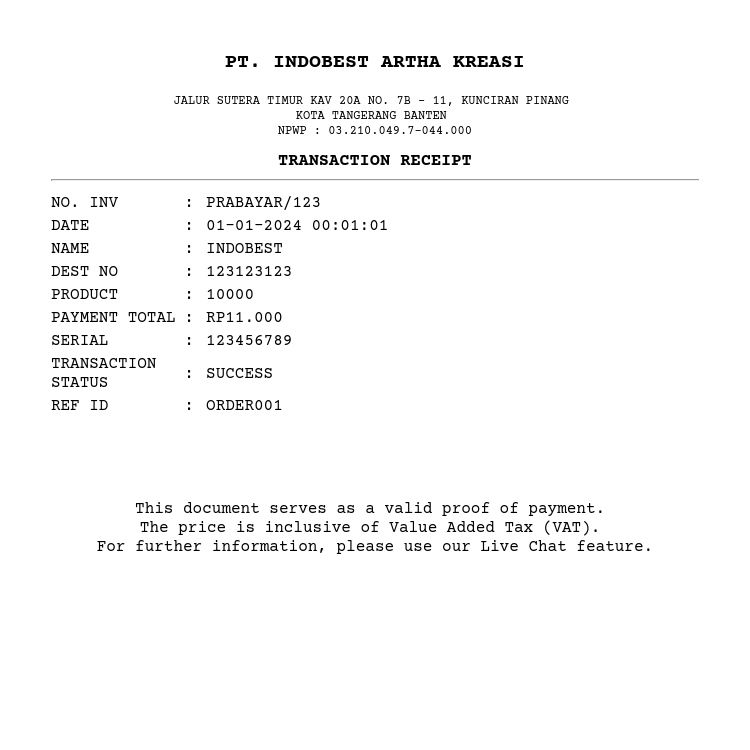
Success Image Receipt Response Example
The response will be receipt in JPEG/PNG file format.
Failed / Pending Response
| Attributes | Type | Description | Mandatory |
|---|---|---|---|
| rc | String | Response code. See response code list | Yes |
| message | String | Message | Yes |
| status | Double | Transaction Status. List of status: 0:PROCESS 1:SUCCESS 2:FAILED | Yes |
Failed Transaction Response Example
These response indicate a failed transaction status.
{
    "data": {
        "rc": "07",
        "message": "FAILED",
        "status": 2
    }
}
Pending Transaction Response Example
These response indicate a pending transaction status.
{
    "data": {
        "rc": "39",
        "message": "PROCESS",
        "status": 0
    }
}
API to download receipt with PDF format after making prepaid transaction.
Test Case
This documentation explains how to test top-up transactions in the sandbox environment. By using specific test case numbers, you can receive SUCCESS or FAILED status responses during the Check Status process without manually updating the transaction status in the sandbox report.